
You can easily view and download your Invoice-Based Credit Report from your LateShipment.com dashboard. Follow the steps below to access the report and export it in your preferred format.
Access the Invoice-Based Credit Report
Log in to your LateShipment.com account.
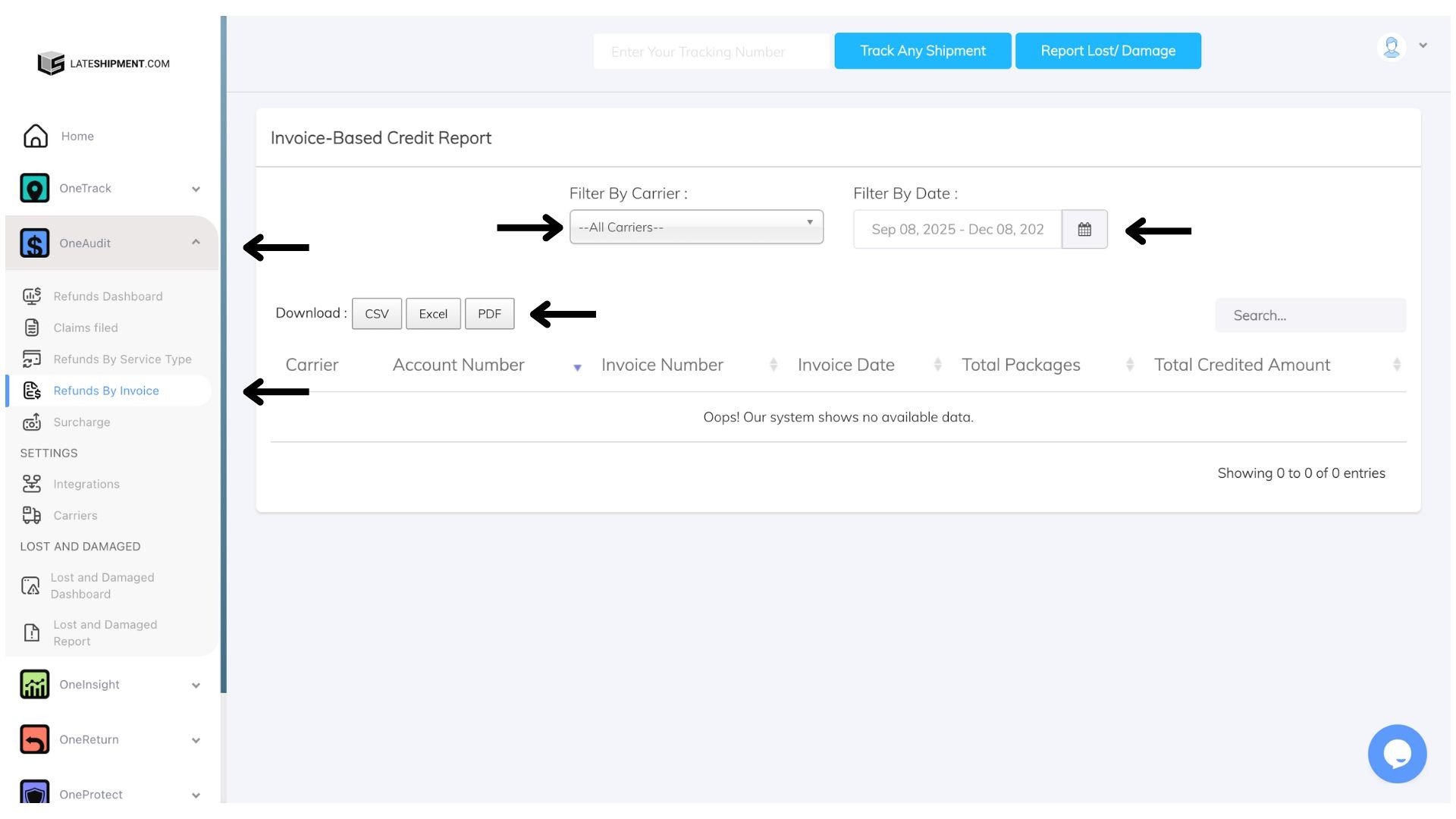
On the left-hand menu, click One Audit.
Select Refunds by Invoice.
You will be redirected to the Invoice-Based Credit Report Dashboard.
What You’ll See in the Dashboard
The dashboard displays key invoice-level refund details, including:
Carrier
Account Number
Invoice Number
Invoice Date
Total Packages
Total Credited Amount
All data will be presented in a structured table for easy review.
Generate and Download a Report
To create and download a customized report:
Filter by Carrier
Select specific carriers
Or choose All Carriers to include everything
Filter by Date
Choose the invoice date range you want to include
Choose Download Format
Select CSV, PDF, or Excel
Click Download to export the report in the chosen format.
? Tip: Use filters to focus on specific carriers or date ranges for faster analysis and cleaner reports.
Was this article helpful?
That’s Great!
Thank you for your feedback
Sorry! We couldn't be helpful
Thank you for your feedback
Feedback sent
We appreciate your effort and will try to fix the article